


✓
SIGNED CONTRACTAcme Manufacturing.pdfEffective Sep 1, 2026 · 12 months
From the team behind SaaSync
Your SaaS metrics start with the invoices behind them. BillCadence organizes subscription changes and prepares invoices for approval in QuickBooks Online or Xero, giving SaaSync more consistent billing data to carry into ChartMogul.
ChartMogul integration available. BillCadence is free during private beta.
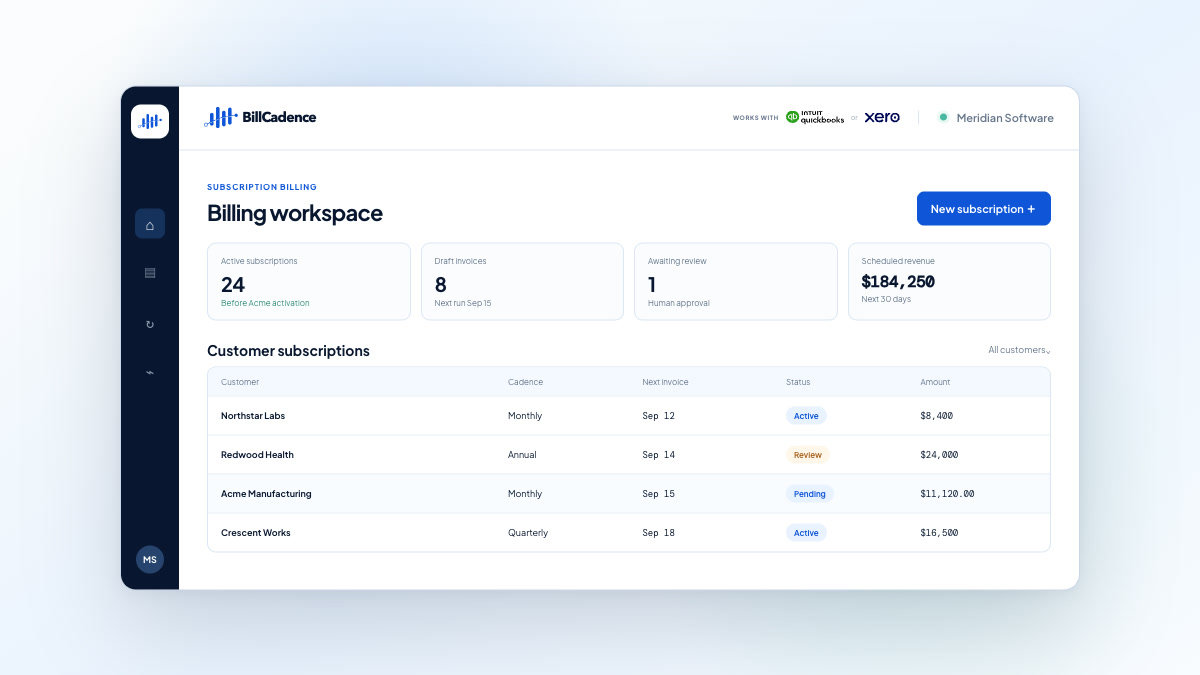
Illustrative example. Private-beta production invoices require human approval.
Built for this exact stack
The gap between accounting and analytics
Accounting software knows what was invoiced. SaaS analytics also needs to understand why it changed—whether a line represents an upgrade, downgrade, renewal, cancellation, or one-time charge, and which service period it belongs to.
SaaSync bridges that gap, but it still needs accurate source data. BillCadence controls the subscription change before the invoice is created, helping SaaSync carry more consistent data into ChartMogul. Complete transactions can sync automatically; missing context still needs review.
 QuickBooks Online
 Data sync
✓ Complete data syncs automatically; missing context may need review
How the systems work together
Keep your accounting and analytics tools while bringing future billing changes under control.
See the complete billing workflow Billing with QuickBooks Online Billing with Xero
Why the source data breaks down
An invoice records a charge. Recurring-revenue reporting also needs the subscription terms and service period behind it, especially when seats, plans, or renewal terms change.
When future changes live in spreadsheets, calendar reminders, and repeated template edits, inconsistent line items and missing service periods make reliable SaaS metrics harder to produce.
SaaSync can transform your accounting data for ChartMogul, but automation depends on that data being accurate, complete, and consistent in the first place.
What stays familiar
What becomes controlled
Accounting-to-analytics experienceBuilt from the same firsthand experience
Through SaaSync, our team has worked with companies using QuickBooks Online or Xero and seen the same pattern: getting billing data into analytics is valuable, but the work of keeping changing subscription terms and invoices aligned still falls on finance.
BillCadence is designed for invoice-first B2B SaaS companies that want to solve that upstream problem without taking on a full billing platform migration.
Before you connect
Yes. BillCadence’s ChartMogul workflow is available through QuickBooks Online or Xero and SaaSync. BillCadence remains in private beta, with free participation and human approval for production invoices.
You need BillCadence, a QuickBooks Online or Xero account, and SaaSync connected to ChartMogul. BillCadence’s free private beta does not include subscriptions to your accounting or analytics software.
Invoices created by BillCadence generally include the subscription context SaaSync needs and flow through to ChartMogul automatically, without additional review in SaaSync. If you also create invoices directly in QuickBooks Online or Xero, those invoices may enter SaaSync’s review queue when required data, such as service periods or recurring versus one-time charge details, is missing.
Yes. During private beta, a person reviews and approves production invoices before BillCadence posts them to QuickBooks Online or Xero. That approval is separate from any downstream data review in SaaSync. BillCadence reconciles the posted invoice with the approved billing intent.
BillCadence uses existing billing context during onboarding, but its primary responsibility starts at controlled cutover: keeping future billing changes and invoices aligned. Historical data cleanup remains a separate task; this workflow does not promise to repair past invoices or reporting automatically.
No. BillCadence manages future billing intent, SaaSync carries accounting data into ChartMogul, and ChartMogul provides analytics. QuickBooks Online or Xero remains your accounting source of truth.
Yes. BillCadence’s core subscription-billing workflow works with QuickBooks Online or Xero. SaaSync and ChartMogul are needed for the analytics path described on this page, not for managing billing changes and reviewing invoices in BillCadence.
Follow SaaSync’s QuickBooks Online integration guide or Xero integration guide to connect your accounting account and ChartMogul. For connection instructions and source-data requirements, visit the SaaSync help center. Bring us your current workflow to discuss BillCadence onboarding.
Review how changing subscriptions become approved invoices and reach ChartMogul through SaaSync. BillCadence private beta participation is free.